/
October 26, 2026
What Happens During an Odoo ERP Implementation? From Planning to Go-Live
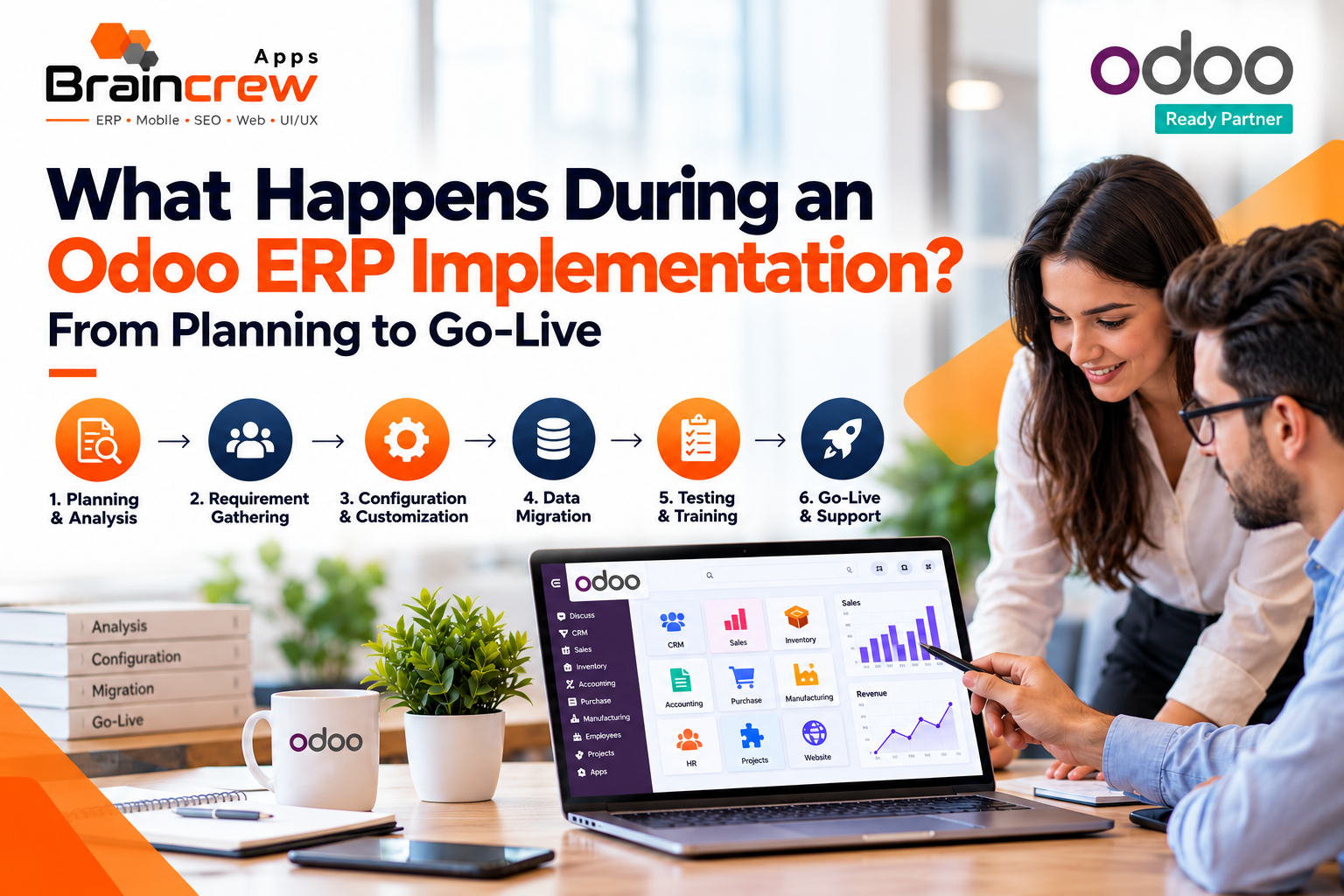
Implementing an ERP system involves more than installing software. Businesses need to und erstand their workflows, organize data, configure applications, train employees, and test the system before using it for daily operations. Odoo ERP brings business functions together, helping companies manage sales, inventory, accounting, purchasing, and customer relationships through one platform.
A structured implementation process helps businesses reduce confusion, avoid unnecessary customization, and prepare employees for the transition. Braincrew Apps helps businesses explore Odoo ERP solutions that align with their operational requirements, making it important to understand each implementation stage before starting the project.
Quick Answer: What Happens During an Odoo ERP Implementation?
An Odoo ERP implementation typically involves requirement analysis, project planning, application selection, system configuration, customization, data migration, testing, employee training, and go-live support. The exact steps depend on business size, operational complexity, integrations, and reporting needs. Working with an experienced implementation partner can help businesses prepare for the transition and establish a system that supports their daily operations.
1. Business Requirement Analysis and Planning
The first step is understanding how the business operates and what it expects from the new ERP system. The implementation team works with key stakeholders to identify operational challenges, existing software limitations, and opportunities to improve workflows.
During this stage, businesses typically review:
- Current sales, purchasing, inventory, and accounting processes.
- Department-specific requirements and responsibilities.
- Existing software and third-party integrations.
- Reporting, approval, and automation needs.
- Project budget, timeline, and business priorities.
This analysis creates a clear project scope and helps determine which Odoo applications are required. It also identifies processes that may need improvement before they are transferred to the new system.
2. Selecting the Right Odoo Applications
Once requirements are documented, the next step is selecting the applications that match business needs. Odoo offers applications for different business functions, allowing organizations to build a system around their operational requirements.
Business requirement | Relevant Odoo application |
Lead and customer management | CRM |
Sales orders and quotations | Sales |
Stock and warehouse operations | Inventory |
Supplier and purchasing processes | Purchase |
Financial records and invoicing | Accounting |
Employee records and leave management | Employees and Time Off |
Online store management | eCommerce |
The final application selection should depend on the organization’s processes rather than the number of available features. Starting with essential applications can also make implementation easier to manage.
3. System Configuration and Customization
After selecting the applications, the implementation team configures Odoo according to the agreed requirements. This may include setting up company details, users, access permissions, warehouses, taxes, approval rules, and document templates.
Standard configuration should be considered first. If existing features do not meet an essential business requirement, the team can evaluate suitable third-party modules, integrations, or custom development.
A professional Odoo implementation service helps businesses identify which features can be managed through standard configuration and which require customization. Braincrew Apps provides Odoo ERP solutions tailored to business requirements, helping organizations streamline workflows, improve operational efficiency, and implement suitable ERP features based on their specific needs.
4. Data Preparation and Migration
Data migration is one of the most important stages of an ERP project. Businesses may need to transfer customer records, supplier details, product information, inventory balances, and relevant financial data from spreadsheets or legacy systems.
The process generally includes:
- Identifying the data that needs to be transferred.
- Removing duplicate, outdated, or incorrect records.
- Mapping existing fields to the appropriate Odoo fields.
- Importing sample data and checking the results.
- Reconciling important records and balances before final migration.
Businesses should decide which historical records are necessary and verify the accuracy of migrated data. A successful migration is not simply about transferring information; it is about ensuring that employees can use reliable data from the first day.
5. Integration and Workflow Testing
Many businesses rely on external systems for payments, eCommerce, shipping, payroll, or specialized operational processes. These systems may need to exchange information with Odoo through supported integrations.
Before launch, the implementation team should test complete workflows rather than checking each application in isolation.
For example, a sales order may need to update inventory, generate an invoice, and create the appropriate accounting entries. Testing should confirm that each step works correctly and that information is recorded consistently.
Important checks include:
- User permissions and access restrictions.
- Sales, purchase, and inventory workflows.
- Accounting entries and invoice calculations.
- Integration reliability and error handling.
- Reports, dashboards, and approval processes.
- System performance and data accuracy.
This stage helps identify problems while there is still time to resolve them before the live system is used.
6. Employee Training and User Acceptance Testing
Even a well-configured ERP system may not deliver the expected benefits if employees do not know how to use it. Training should be tailored to each department’s responsibilities.
For example, sales teams may need training on quotations and orders, warehouse employees may need guidance on stock movements, and finance teams may need to understand invoices and reconciliation workflows.
User acceptance testing (UAT) allows employees and business stakeholders to test realistic scenarios using the configured system. They can confirm whether the workflows meet business requirements and report issues before launch.
Training materials, process documentation, and a clear method for reporting problems can help employees feel more prepared for the transition.
7. Go-Live Preparation and Launch
Go-live is the point when the business starts using Odoo for its intended live operations. Before this happens, the implementation team should confirm that critical requirements have been tested and that the organization is ready.
A typical go-live checklist includes:
- Final approval of the configured system.
- Verification of migrated data and opening balances.
- Confirmation of user accounts and permissions.
- Completion of essential employee training.
- A documented plan for switching from the old system.
- Backup and recovery arrangements.
- A clear process for reporting urgent issues.
Businesses should also decide when to stop entering transactions into the old system and begin using Odoo. Depending on operational complexity, the transition may happen in stages or through a coordinated launch.
8. Post-Go-Live Support and Improvement
Implementation does not end when the system goes live. Employees may encounter questions, unexpected errors, or workflow gaps as they begin using Odoo in real business situations.
Post-launch support helps address these issues, monitor system performance, and make necessary adjustments. The team can also collect user feedback and identify opportunities for further automation.
When evaluating Odoo ERP Implementation Services, businesses should consider post-implementation support, issue resolution, system maintenance, and future upgrades. Braincrew Apps offers Odoo ERP services to help businesses address their implementation requirements, streamline workflows, and explore suitable solutions for maintaining and improving their ERP systems as their business needs evolve.
How Long Does an Odoo ERP Implementation Take?
The timeline depends on the number of applications, customization requirements, data quality, integrations, and availability of the project team. A relatively simple implementation may take weeks, while a complex, multi-department project can take several months or longer.
Clear requirements, timely decisions, organized data, and active participation from employees can help prevent avoidable delays. Businesses should agree on milestones with their implementation partner rather than relying on a generic timeline.
FAQ
What are the main stages of Odoo ERP implementation?
The main stages include planning, requirement analysis, application selection, configuration, customization, data migration, testing, training, go-live, and post-launch support.
How long does Odoo ERP implementation take?
The timeline depends on business complexity, the number of applications, integration requirements, data migration, and customization needs.
Is customization always required during Odoo implementation?
No. Many requirements can be addressed through standard applications and configuration, while custom development is useful for specific needs that existing features cannot meet.
Why is data migration important in Odoo implementation?
Accurate data migration helps ensure that customer, supplier, inventory, and financial records are reliable when the business begins using Odoo.
How can Braincrew Apps help with Odoo ERP implementation?
Businesses can contact Braincrew Apps to discuss their ERP requirements and explore suitable implementation, configuration, and customization options based on their needs.